Building an AI platform on Kubernetes
Once three teams have each rebuilt GPU scheduling, model serving and RAG plumbing, you don't have an AI strategy — you have three. Here's how to turn that into one paved road on Kubernetes: a gateway, a serving layer, GPU compute and the cross-cutting concerns that make it production-grade.
The first AI feature a company ships is a script. The second is a copy of the script. By the third, you have three teams who have each separately solved GPU scheduling, model serving, retrieval, rate limiting and cost tracking — slightly differently, all of it fragile, none of it shared. That's the moment to build a platform: not a bigger script, but a paved road that lets a team ship an AI feature without reinventing the plumbing underneath it.
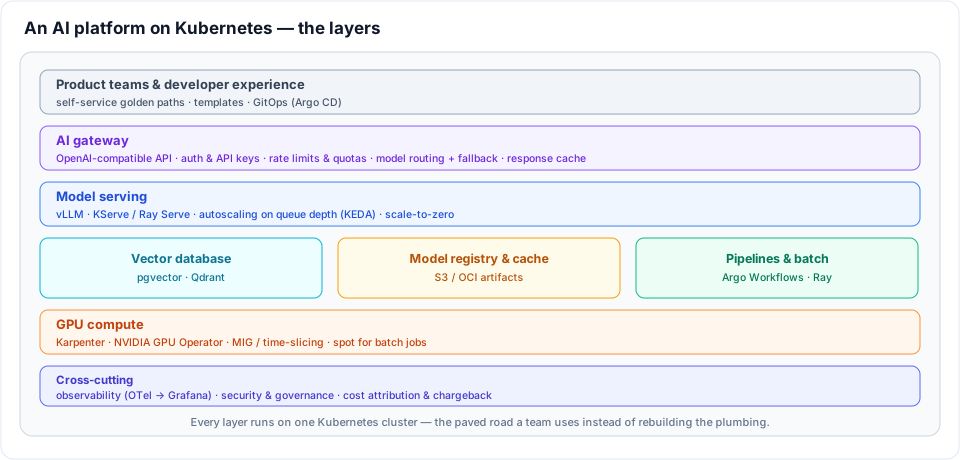
Kubernetes is the right substrate for this. It already gives you scheduling, autoscaling, secrets, networking and a declarative API; an AI platform is mostly a matter of adding the few layers that are specific to running models. This post is the architecture I build, layer by layer. Several of the layers I've covered in depth on their own — this is how they fit together.
Start from the consumer, not the GPU
The mistake is to build bottom-up — stand up GPUs, then a model server, then wonder why nobody uses it. Build top-down from the interface a product team wants: an OpenAI-compatible endpoint, an API key, a quota and a dashboard. Everything below exists to serve that contract. If a team can point their existing SDK at your gateway, change the base URL and ship, the platform is working. If they need to learn Kubernetes to call a model, it isn't.
The AI gateway
The gateway is the front door and the single most valuable layer, because it's where the cross-team concerns live. One OpenAI-compatible API in front of every model — hosted and self-hosted — gives you a place to enforce things you'd otherwise scatter across every app:
- Authentication and API keys per team or per app
- Rate limits and quotas, so one runaway job can't starve everyone else
- Model routing and fallback — route
gpt-4oto OpenAI,llama-3.1to your own vLLM servers, and fail over when a provider degrades - Response caching for identical requests
- Cost attribution — every call tagged with a team, so spend is accountable
Tools like LiteLLM or Envoy AI Gateway implement this pattern. The key decision is to make the gateway mandatory: if teams can call models directly, you lose the governance and the cost visibility that justify the platform.
The serving layer
Behind the gateway sits the serving layer for models you host yourself. vLLM is the workhorse for LLM inference — high throughput, OpenAI-compatible, and I've covered deploying it in deploying AI inference on Kubernetes. Wrap it with KServe or Ray Serve when you want a higher-level model abstraction, canary rollouts and a consistent deploy surface across many models.
Two properties make serving production-grade on Kubernetes:
- Autoscale on the right signal. CPU is meaningless for inference. Scale on queue depth or concurrent requests with KEDA, so replicas track actual load.
- Scale to zero. GPUs are expensive and most internal models are bursty. A model that scales to zero when idle and cold-starts on demand is the difference between an affordable platform and a frightening bill — provided you accept the cold-start latency or keep a warm minimum for latency-sensitive models.
The data and orchestration layer
Models are stateless; the value around them isn't. Three supporting services cover most needs:
- A vector database for retrieval — pgvector or Qdrant — shared rather than re-deployed per app. The retrieval half of a RAG request is its own discipline, covered in building a RAG pipeline.
- A model registry and cache. Pulling tens of gigabytes of weights from the internet on every pod start is slow and fragile. Stage weights in S3 or as OCI artifacts and cache them on the nodes, so a new replica starts in seconds.
- Pipelines and batch. Argo Workflows or Ray for the offline work — embedding backfills, evaluations, fine-tuning jobs — that shouldn't share capacity or priority with live serving.
GPU compute: the expensive foundation
GPUs are where an AI platform's cost is won or lost, so the compute layer needs real attention:
- The NVIDIA GPU Operator installs the drivers, device plugin and monitoring so nodes can actually schedule GPU workloads.
- Right-size with MIG or time-slicing. A whole A100 for a small model is waste. Multi-Instance GPU partitions a card into isolated slices; time-slicing shares one across pods that don't need it all. Most internal inference doesn't need a full GPU.
- Karpenter for elastic GPU nodes. Provision GPU nodes on demand and remove them when idle, rather than parking a static, costly pool. This is the same approach from reducing Kubernetes costs with Karpenter.
- Spot for batch, on-demand for serving. Training and embedding jobs are interruptible and belong on spot; latency-sensitive serving generally doesn't — the when-to-use-spot decision applies directly here.
The cross-cutting concerns
These span every layer, and skipping them is what separates a demo from a platform:
- Observability. AI workloads fail in ways HTTP status codes don't capture — silent quality drops, token-cost spikes, latency you can't explain. Instrument with OpenTelemetry's GenAI conventions and watch tokens, cost and traces in Grafana, as in observability for AI applications.
- Security and governance. Tenant isolation, secrets management, prompt and response logging with PII redaction, and policy on which teams may call which models.
- Cost attribution and chargeback. Every request carries a team tag from the gateway to the GPU, so you can answer "who spent this" — the question that decides whether the platform survives its first budget review.
Make it self-service
A platform nobody can use without you is a bottleneck, not a platform. The final layer is developer experience: golden-path templates so a new AI service is a git push rather than a ticket, everything defined in code and reconciled by Argo CD, and a catalogue (Backstage or similar) where teams discover the available models and their quotas. The goal is that shipping the fourth AI feature takes a day, not a quarter — because the platform already solved GPUs, serving, retrieval, the gateway and observability once, for everyone.
Build it incrementally
Don't try to land all of this at once. The order that works: a gateway in front of hosted models first (instant cost visibility and governance, no GPUs needed), then a self-hosted serving layer on elastic GPU nodes, then the data and pipeline services, with observability and cost attribution wired in from day one because they're painful to retrofit. Each step pays for itself, and by the end the plumbing every team kept rebuilding is just there — the paved road they take without thinking about it.
Related posts
Deploying AI inference on Kubernetes
A practical guide to running AI model inference workloads on Kubernetes with vLLM — resource limits, autoscaling and serving at scale.
Agent memory and context engineering in Postgres (3/3)
An agent whose pod can vanish mid-investigation and whose workflow exits after thirty minutes idle — so every message it has ever seen is a row, in one table with a raw column and a compacted one, with tool output reduced before it reaches the context. Plus one incident thread walked row by row, from 42,709 tokens of telemetry down to 1,889.
Incident agents with LangGraph, LangChain and MCP (1/3)
How the investigation itself is built and run — MCP servers as the only door to Prometheus, Loki, Tempo and pod events; a LangGraph state graph running the telemetry sweep and the recall search in parallel; a ReAct loop confined to a single node; an LLM judge deciding whether anything gets posted; why none of it can live inside workflow code; and KEDA scaling the workers to zero between incidents.