Deploying AI inference on Kubernetes
A practical guide to running AI model inference workloads on Kubernetes with vLLM — resource limits, autoscaling and serving at scale.
Running AI models in production is a different class of problem from a typical web service. The compute profile is spiky, models are large, startup times are slow and GPU scheduling adds a new layer of complexity. Here's the setup that's worked for me across a few deployments.
The stack
- vLLM — high-throughput inference server with an OpenAI-compatible API, PagedAttention and continuous batching
- Kubernetes — orchestration, resource limits, rolling deployments
- KEDA — autoscaling driven by vLLM's own queue metrics, not CPU
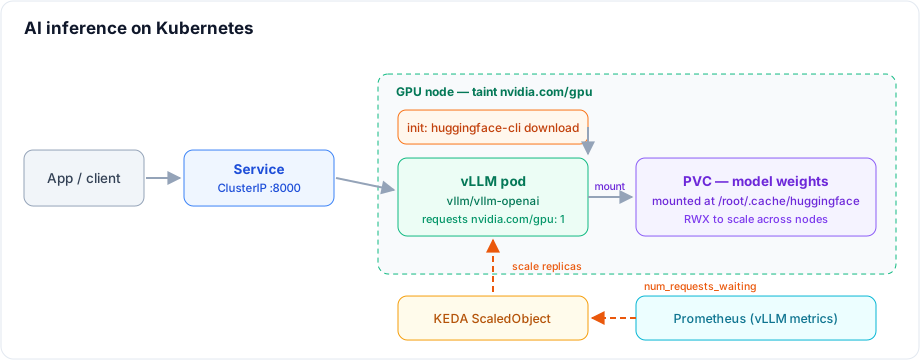
- Persistent Volume — model weights live here, not in the container image
Why not bake models into the image?
A 7B parameter model in fp16 is roughly 14–16 GB. Embedding it in a Docker image makes every pull and every node that runs the pod download that data. Instead, mount a PVC at /root/.cache/huggingface — vLLM's Hugging Face cache — and download the model once. The container image stays small, and the weights survive pod restarts.
ReadWriteOnce is fine for a single replica. If you plan to scale across nodes (see autoscaling below), switch to a ReadWriteMany volume backed by NFS, EFS or Filestore — or give each replica its own volume with a StatefulSet and volumeClaimTemplates. An RWO volume can only be mounted by pods on one node, so extra replicas elsewhere will stay Pending.
apiVersion: v1
kind: PersistentVolumeClaim
metadata:
  name: hf-cache
  namespace: ai
spec:
  accessModes: [ReadWriteOnce]
  resources:
    requests:
      storage: 100Gi
Deployment
vLLM ships an OpenAI-compatible server in the vllm/vllm-openai image. Pass the model with --model, cap context with --max-model-len and let it use most of the GPU with --gpu-memory-utilization. Gated models (like Llama) need a Hugging Face token, injected as an environment variable from a Secret.
apiVersion: apps/v1
kind: Deployment
metadata:
  name: vllm
  namespace: ai
spec:
  replicas: 1
  selector:
    matchLabels:
      app: vllm
  template:
    metadata:
      labels:
        app: vllm
    spec:
      containers:
        - name: vllm
          image: vllm/vllm-openai:latest
          args:
            - '--model=meta-llama/Llama-3.2-3B-Instruct'
            - '--max-model-len=8192'
            - '--gpu-memory-utilization=0.90'
          ports:
            - containerPort: 8000
          env:
            - name: HF_HOME
              value: /root/.cache/huggingface
            - name: HF_TOKEN
              valueFrom:
                secretKeyRef:
                  name: hf-token
                  key: token
          resources:
            requests:
              cpu: '4'
              memory: '16Gi'
            limits:
              cpu: '8'
              memory: '24Gi'
              nvidia.com/gpu: '1'
          volumeMounts:
            - name: hf-cache
              mountPath: /root/.cache/huggingface
            - name: dshm
              mountPath: /dev/shm
          # vLLM is slow to start: model load + CUDA graph capture.
          # Use a startup probe so the pod isn't killed before it's ready.
          startupProbe:
            httpGet:
              path: /health
              port: 8000
            periodSeconds: 10
            failureThreshold: 30
          readinessProbe:
            httpGet:
              path: /health
              port: 8000
            periodSeconds: 10
      volumes:
        - name: hf-cache
          persistentVolumeClaim:
            claimName: hf-cache
        - name: dshm
          emptyDir:
            medium: Memory
            sizeLimit: 2Gi
---
apiVersion: v1
kind: Service
metadata:
  name: vllm
  namespace: ai
spec:
  selector:
    app: vllm
  ports:
    - port: 8000
      targetPort: 8000
The dshm volume gives vLLM a larger /dev/shm, which it needs for tensor parallelism across multiple GPUs — harmless for the single-GPU case and saves a confusing crash later.
Pre-pulling models with an init container
Downloading 16 GB on first request means the first user waits minutes. Use an init container to fetch the weights into the cache PVC before the server starts:
initContainers:
  - name: fetch-model
    image: vllm/vllm-openai:latest
    command:
      - 'huggingface-cli'
      - 'download'
      - 'meta-llama/Llama-3.2-3B-Instruct'
    env:
      - name: HF_HOME
        value: /root/.cache/huggingface
      - name: HF_TOKEN
        valueFrom:
          secretKeyRef:
            name: hf-token
            key: token
    volumeMounts:
      - name: hf-cache
        mountPath: /root/.cache/huggingface
Once the model is in the PVC, restarts and rescheduled pods reuse it instead of re-downloading.
GPU nodes
vLLM needs a CUDA GPU — it won't run on CPU. Add the NVIDIA device plugin so the cluster can schedule GPU resources:
kubectl apply -f https://raw.githubusercontent.com/NVIDIA/k8s-device-plugin/v0.16.0/deployments/static/nvidia-device-plugin.yml
The nvidia.com/gpu: "1" limit in the Deployment above tells Kubernetes to place the pod on a node with a free GPU. Taint GPU nodes so only GPU workloads land there:
kubectl taint nodes <gpu-node> nvidia.com/gpu=present:NoSchedule
And add a matching toleration to your Deployment so vLLM pods can be scheduled there.
Autoscaling
GPU pods don't scale the same way HTTP services do. Thanks to continuous batching, a single vLLM replica handles many concurrent requests well — so scale on the depth of vLLM's own request queue, not CPU. vLLM exposes Prometheus metrics at /metrics, including vllm:num_requests_waiting, which KEDA can scale on directly:
apiVersion: keda.sh/v1alpha1
kind: ScaledObject
metadata:
  name: vllm-scaler
  namespace: ai
spec:
  scaleTargetRef:
    name: vllm
  minReplicaCount: 1
  maxReplicaCount: 4
  triggers:
    - type: prometheus
      metadata:
        serverAddress: http://prometheus.monitoring.svc.cluster.local:9090
        query: sum(vllm:num_requests_waiting)
        threshold: '5'
Keep minReplicaCount at 1 — scaling a GPU model from zero means a cold start measured in minutes, which most request paths can't absorb.
Exposing the API
vLLM speaks the OpenAI API, so any OpenAI client works — just point it at the Service:
curl http://vllm.ai.svc.cluster.local:8000/v1/chat/completions \
  -H "Content-Type: application/json" \
  -d '{"model":"meta-llama/Llama-3.2-3B-Instruct",
       "messages":[{"role":"user","content":"Hello"}]}'
From your app pods, set the OpenAI base URL to http://vllm.ai.svc.cluster.local:8000/v1. For external access, put it behind Cloudflare Tunnel (no public IP needed) or an internal ingress with auth.
The biggest operational lesson: a cold vLLM pod can take one to three minutes to become ready — model load plus CUDA graph capture — so rely on a startupProbe with a generous failureThreshold rather than a long readiness delay. A misconfigured probe will put the pod into a restart loop before it's ever ready.
Related posts
Building an AI platform on Kubernetes
Once three teams have each rebuilt GPU scheduling, model serving and RAG plumbing, you don't have an AI strategy — you have three. Here's how to turn that into one paved road on Kubernetes: a gateway, a serving layer, GPU compute and the cross-cutting concerns that make it production-grade.
Agent memory and context engineering in Postgres (3/3)
An agent whose pod can vanish mid-investigation and whose workflow exits after thirty minutes idle — so every message it has ever seen is a row, in one table with a raw column and a compacted one, with tool output reduced before it reaches the context. Plus one incident thread walked row by row, from 42,709 tokens of telemetry down to 1,889.
Incident agents with LangGraph, LangChain and MCP (1/3)
How the investigation itself is built and run — MCP servers as the only door to Prometheus, Loki, Tempo and pod events; a LangGraph state graph running the telemetry sweep and the recall search in parallel; a ReAct loop confined to a single node; an LLM judge deciding whether anything gets posted; why none of it can live inside workflow code; and KEDA scaling the workers to zero between incidents.