Reducing Kubernetes costs by 35% with Karpenter and spot instances
How we cut an EKS compute bill by roughly a third — replacing static node groups with Karpenter, running the stateless majority on spot and letting consolidation reclaim idle capacity, without trading away reliability.
Most EKS bills are dominated by compute, and most of that compute is idle. Nodes are sized for peak, sit half-empty overnight and run on-demand pricing for workloads that never needed it. We moved a production cluster off managed node groups and Cluster Autoscaler onto Karpenter, put the stateless majority on spot and let consolidation keep nodes full. The monthly compute bill dropped about 35%. This is where the savings came from and how to get them without trading reliability for cost.
Where the money actually goes
Before optimising anything, it helps to name the waste. On a typical cluster with managed node groups it looks like this:
- Nodes sized for peak. Capacity provisioned for the busiest hour stays running at 3am.
- One node group per instance type. Each group is a separate scaling unit, so capacity fragments and bin-packing across types is impossible.
- Cluster Autoscaler can't choose instances. It only scales the node groups you defined — it never picks a cheaper or better-fitting instance type for you.
- On-demand for everything. Stateless, restartable workloads pay full price for no benefit.
Why Karpenter instead of Cluster Autoscaler
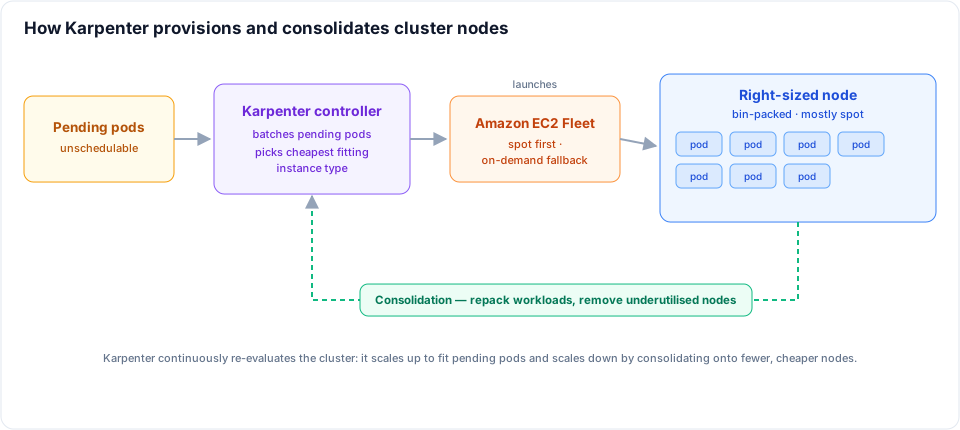
Karpenter watches pending pods directly and provisions a node sized to fit them, chosen from a broad pool of instance types. There are no fixed node groups to maintain. It bin-packs pods onto nodes, consolidates them as load changes and terminates nodes it no longer needs.
That gives you three levers, and we pulled all three: instance flexibility (so spot is viable), bin-packing (so nodes run full) and consolidation (so idle capacity is reclaimed automatically).
Defining what Karpenter can launch
Two resources describe the fleet. A NodePool sets the constraints — which capacity types, architectures and instance families Karpenter may use — and an EC2NodeClass describes the AWS-specific node template.
The single most important choice is breadth. The wider the set of instance types you allow, the better Karpenter bin-packs and the more spot capacity pools it can draw from.
apiVersion: karpenter.sh/v1
kind: NodePool
metadata:
  name: default
spec:
  template:
    spec:
      requirements:
        - key: karpenter.sh/capacity-type
          operator: In
          values: ['spot', 'on-demand'] # prefer spot, fall back to on-demand
        - key: kubernetes.io/arch
          operator: In
          values: ['amd64']
        - key: karpenter.k8s.aws/instance-category
          operator: In
          values: ['c', 'm', 'r']
        - key: karpenter.k8s.aws/instance-generation
          operator: Gt
          values: ['5'] # modern generations only
      nodeClassRef:
        group: karpenter.k8s.aws
        kind: EC2NodeClass
        name: default
      expireAfter: 720h # recycle nodes at least every 30 days
  limits:
    cpu: '1000' # hard ceiling on what this pool can launch
  disruption:
    consolidationPolicy: WhenEmptyOrUnderutilized
    consolidateAfter: 1m
apiVersion: karpenter.k8s.aws/v1
kind: EC2NodeClass
metadata:
  name: default
spec:
  amiFamily: AL2023
  role: 'KarpenterNodeRole-prod'
  amiSelectorTerms:
    - alias: al2023@latest
  subnetSelectorTerms:
    - tags:
        karpenter.sh/discovery: 'prod'
  securityGroupSelectorTerms:
    - tags:
        karpenter.sh/discovery: 'prod'
Note the limits block — it caps how much the pool can ever launch, which is your safety net against a runaway workload provisioning the whole region.
Spot instances: the biggest single lever
Spot capacity is the same hardware as on-demand at 60–90% off, with one catch: AWS can reclaim it with a two-minute warning. The way to make that safe is diversity. By allowing many instance types and sizes, Karpenter spreads across spot capacity pools, so when one pool is reclaimed it can immediately launch from another.
Karpenter uses a price-capacity-optimised allocation strategy under the hood, so it favours the pools least likely to be interrupted rather than purely the cheapest. With capacity-type set to both spot and on-demand, it prefers spot and only falls back to on-demand when no spot capacity fits.
This is where the largest chunk of the saving lives — but only if your workloads can tolerate a node disappearing.
Surviving spot interruptions
When AWS issues a reclaim notice, Karpenter sees it on an interruption queue (an SQS queue fed by EventBridge), cordons and drains the node, and launches a replacement ahead of the reclaim. You enable it by pointing Karpenter at the queue:
helm upgrade karpenter oci://public.ecr.aws/karpenter/karpenter \
  --namespace kube-system \
  --set "settings.clusterName=prod" \
  --set "settings.interruptionQueue=prod"
The cluster side still has to be resilient — Karpenter handling the node gracefully is not enough if the workload can't move:
- Run multiple replicas so a drained node never takes the last one.
- Set PodDisruptionBudgets so voluntary evictions can't drop you below a safe count.
- Spread with topology constraints across zones and nodes so a single reclaim isn't concentrated.
apiVersion: policy/v1
kind: PodDisruptionBudget
metadata:
  name: checkout
spec:
  minAvailable: 80%
  selector:
    matchLabels:
      app: checkout
Deciding which workloads belong on spot in the first place — and how to keep a service available as nodes are reclaimed under it — is its own topic. I've covered it in depth in Spot instances in production: when to use them, when not to and how to maintain availability.
Consolidation: keep nodes full
Spot gets the headline, but consolidation is the quiet, continuous saving. With WhenEmptyOrUnderutilized, Karpenter constantly asks whether the same pods would fit on fewer or cheaper nodes — and if they would, it repacks them and removes the surplus. A node left at 30% utilisation after a scale-down doesn't linger; it gets drained and its pods rescheduled onto existing capacity.
consolidateAfter adds a stabilisation delay so the cluster doesn't churn on every transient change. This single behaviour is what stops the slow creep back towards over-provisioning that plagues static node groups.
Protecting production with disruption budgets
Consolidation and spot replacement both move pods, and unbounded churn during peak hours is its own kind of risk. Disruption budgets rate-limit how much Karpenter may disrupt at once, and let you freeze disruption entirely during business hours:
disruption:
  consolidationPolicy: WhenEmptyOrUnderutilized
  consolidateAfter: 1m
  budgets:
    - nodes: '10%' # at most 10% of nodes disrupted at any time
    - nodes: '0' # no voluntary disruption during the work day
      schedule: '0 9 * * mon-fri'
      duration: 9h
You still get spot interruptions during the freeze — AWS doesn't ask permission — but the voluntary churn from consolidation is paused when it matters most.
What to keep on-demand
Not everything belongs on spot. A second NodePool pinned to on-demand and fenced off with a taint is the right home for workloads that can't absorb a two-minute eviction:
- Stateful sets and databases without fast, safe failover
- Singletons and leader-elected controllers
- Long-running jobs that can't checkpoint
Schedule those onto the on-demand pool with a matching toleration and node selector, and let everything else default to the spot-capable pool.
Where the 35% came from
The headline figure is a blend, not a single trick:
- Spot for the stateless majority — by far the largest contribution, moving roughly 70% of compute to spot pricing.
- Consolidation — reclaiming idle and underutilised nodes that static groups would have left running.
- Right-sizing — Karpenter routinely picking smaller or newer-generation instances that fit the pods better than our fixed groups did.
None of these is exotic. Together, on a cluster that was previously all on-demand managed node groups, they netted out at about a third off the monthly compute line.
Measure it, then cap it
Attribute the saving before you claim it. Tag nodes by NodePool and track cost per node-hour and cost per pod in Kubecost or AWS Cost Explorer, comparing the four weeks before and after. Watch spot interruption rates alongside cost so you can see if you've pushed diversity too thin.
Then set limits on every NodePool. Cost optimisation that has no ceiling is just a different way to get a surprise bill — the point is to run lean and bounded.
Related posts
Spot instances in production: when to use them, when not to and how to maintain availability
When spot instances are the right call, when not to use them at all, and how to keep a service available even as AWS reclaims nodes underneath it. A workload-by-workload model with the reasoning behind each decision.
Sandboxing serverless workloads with gVisor and Kubernetes RuntimeClass
A container is not a security boundary — every pod on a node shares one kernel. Adding gVisor to a pod-per-message serverless platform on Kubernetes: how runsc works, wiring RuntimeClass through Helm and an operator, and the loopback gotcha that breaks kubectl port-forward.
From branch to production: automating multi-environment deployments with GitHub Actions and Argo CD on EKS
How I run 20+ developer environments plus testing, staging and production across two AWS accounts with one standalone deploy-pipeline repo whose workflow every microservice reuses — GitHub Actions building images, self-hosted runners reaching private EKS, and per-cluster Argo CD doing the syncs. On-demand dev deploys, auto-drafted releases and a branch-to-production promotion flow that never rebuilds the artefact.