Zero-downtime Kubernetes upgrades: a production-ready strategy
Kubernetes ships three releases a year and you can't skip them — here's how to keep clusters current without users ever noticing, covering version skew, pre-flight checks, workload readiness and a careful node rollout.
Kubernetes ships roughly three minor releases a year and supports each for about fourteen months, so upgrades aren't optional — fall behind and you lose security patches and run out of support. Done carelessly, an upgrade is an outage; done properly, users never notice. The mechanics are the easy part, especially on managed clusters. Zero downtime is won or lost in workload readiness and a disciplined rollout — and that part is your responsibility, not the cloud provider's.
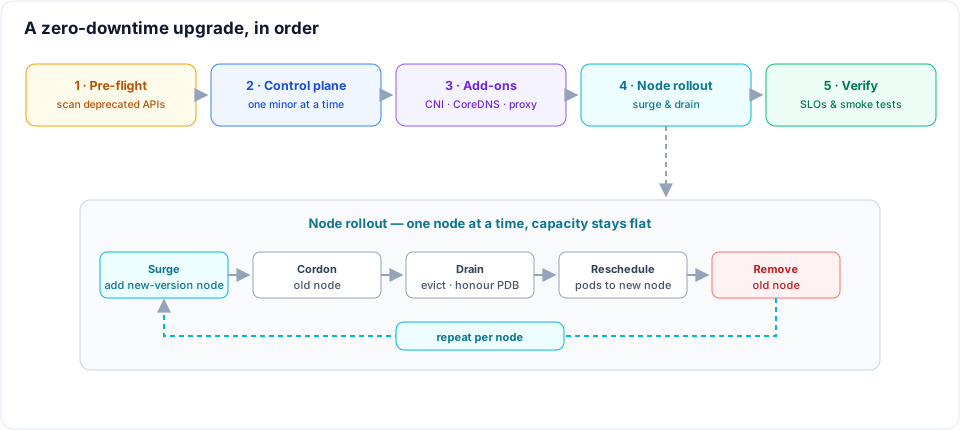
This is the strategy I use in production. It comes down to four things: respect the version rules, catch breaking changes before they bite, make the workloads survive disruption, then roll the nodes carefully.
Respect the version skew rules
Kubernetes only supports a narrow window of version differences between components, and the upgrade order follows directly from it:
- One minor version at a time. You cannot jump from 1.30 to 1.32 — the control plane must step through 1.31. Patch releases are fine to skip.
- Control plane before nodes.
kube-apiservermust never be older than the components talking to it. Upgrade the control plane first, then the nodes. - Kubelet may lag, never lead. A kubelet can run up to three minor versions behind the API server, but never ahead. This is what lets you upgrade the control plane first and roll nodes afterwards without rushing.
So the order is always: control plane → add-ons → nodes. Everything below assumes it.
Pre-flight: catch breaking changes before they bite
The single most common cause of a broken upgrade is a removed API. A workload still using a apiVersion that the new version deleted will simply fail to apply or, worse, silently stop reconciling. Scan for them before you touch anything:
# scan live cluster + manifests for deprecated/removed APIs
kubent                       # kube-no-trouble
# or
pluto detect-files -d ./manifests
The rest of the pre-flight checklist:
- Add-on compatibility. Confirm your CNI, CSI drivers, ingress or Gateway controller, cert-manager and metrics-server all support the target version. These break far more often than core Kubernetes.
- Read the release notes. Every minor version has an "urgent upgrade notes" section. Read it — that's where the foot-guns are documented.
- Back up etcd. On managed clusters you get snapshots; confirm you can restore. On self-managed clusters, take an etcd snapshot before you start.
- Rehearse in staging. Upgrade a staging cluster running the same workloads and add-ons first. If it's going to break, it should break there.
Make workloads resilient first
This is where zero downtime actually comes from. An upgrade reschedules every pod as nodes are drained — if a workload can't tolerate being moved, no amount of careful rollout will save it. Get these right before the upgrade, not during:
- Run multiple replicas. Never serve traffic from a single pod. A drain has to be able to take one replica without taking the service.
- Set PodDisruptionBudgets. A PDB caps how many pods of a workload can be down at once, so a node drain can't evict them all simultaneously. Don't set it so tight that a drain can never make progress.
- Honest readiness probes. Traffic should only reach pods that are actually ready, so replacements coming up on new nodes don't black-hole requests.
- Graceful shutdown. A
preStophook plus a sensibleterminationGracePeriodSecondslets in-flight requests finish and gives the load balancer time to deregister the pod before it dies. - Spread across nodes and zones.
topologySpreadConstraintsstop all replicas landing on one node or in one zone, so draining either doesn't take the whole service.
A deployment that's ready for an upgrade looks like this:
apiVersion: apps/v1
kind: Deployment
metadata:
  name: api
spec:
  replicas: 3
  template:
    spec:
      terminationGracePeriodSeconds: 60
      topologySpreadConstraints:
        - maxSkew: 1
          topologyKey: kubernetes.io/hostname
          whenUnsatisfiable: ScheduleAnyway
          labelSelector:
            matchLabels: {app: api}
      containers:
        - name: api
          readinessProbe:
            httpGet: {path: /healthz, port: 8080}
            periodSeconds: 5
          lifecycle:
            preStop:
              exec:
                command: ['sh', '-c', 'sleep 15'] # let endpoints drain first
---
apiVersion: policy/v1
kind: PodDisruptionBudget
metadata:
  name: api
spec:
  maxUnavailable: 1
  selector:
    matchLabels: {app: api}
Upgrade the control plane
On a managed cluster this is one API call per minor version, and the control plane is highly available, so the API stays up throughout. Trigger it, watch for errors and let it finish before moving on.
aws eks update-cluster-version --name prod --kubernetes-version 1.31
On self-managed clusters, kubeadm upgrade plan then kubeadm upgrade apply on the first control plane node, followed by the rest. Either way, the control plane goes a single minor version at a time.
Upgrade the add-ons
CoreDNS, kube-proxy and your CNI have to be compatible with the new control plane, and the versions are tied to the Kubernetes minor. On EKS these are managed add-ons — bump each to the version that matches the new minor. CoreDNS in particular should roll, not restart all at once, so DNS keeps resolving during the change.
Roll the nodes without dropping traffic
This is the heart of it, and there are two solid strategies.
Surge and drain (in-place pool). Add nodes on the new version, then cordon and drain the old ones a few at a time — letting their pods reschedule onto the new nodes — and remove the old nodes once empty. Capacity stays flat because the new nodes come up before the old ones go down. Managed node groups do this for you; you control the pace with surge and unavailability settings:
# upgrade at most a third of the group at a time
aws eks update-nodegroup-config --cluster-name prod --nodegroup-name app \
  --update-config maxUnavailablePercentage=33

aws eks update-nodegroup-version --cluster-name prod --nodegroup-name app
If you provision nodes with Karpenter, this is driven by drift: when the cluster version changes, Karpenter sees nodes as drifted and replaces them with new-version nodes, with the churn rate governed by disruption budgets.
The manual equivalent, one node at a time:
kubectl cordon ip-10-0-1-23
kubectl drain ip-10-0-1-23 --ignore-daemonsets --delete-emptydir-data
# ... node now empty, terminate it ...
The drain uses the eviction API, which honours PodDisruptionBudgets — that's the mechanism that keeps the service up. If a drain hangs, it's almost always a PDB that's too strict, a pod with no controller to recreate it or local storage blocking eviction. Fix the cause; don't reach for --force in production.
Blue/green node pools. Create a whole new node pool on the new version alongside the old one, cordon the old pool, shift workloads across, then delete the old pool. It needs more capacity temporarily, but rollback is trivial — uncordon the old pool and move back. I favour this for large jumps or unusually risky upgrades, where a clean, instant rollback is worth the extra nodes.
Verify, then watch
The upgrade isn't done when the nodes are new — it's done when you've confirmed nothing regressed:
kubectl get nodesshows every node on the new version andReady.- System and add-on pods are healthy, DNS resolves, ingress serves.
- Your SLOs — error rate and latency — held steady through the rollout. Watch them during, not just after.
- Run smoke tests or synthetic checks against the real endpoints.
Keep the rollback path open until you're confident, and only then call it finished.
Make it boring
The best defence against a scary upgrade is to never have a big one. Stay close to the latest supported version so every hop is small, keep the cluster version and node pools in Terraform or Argo CD so each upgrade is a reviewed pull request, and rehearse on staging on a schedule. Zero-downtime upgrades aren't a feature you switch on — they're the payoff for version discipline, resilient workloads and a node rollout that never takes more capacity than your PDBs allow.
Related posts
Agent memory and context engineering in Postgres (3/3)
An agent whose pod can vanish mid-investigation and whose workflow exits after thirty minutes idle — so every message it has ever seen is a row, in one table with a raw column and a compacted one, with tool output reduced before it reaches the context. Plus one incident thread walked row by row, from 42,709 tokens of telemetry down to 1,889.
How an AI does first-level incident analysis
The first fifteen minutes of every production alert are the same seven steps against the same four systems — and the one step that matters most, "have we seen this before?", is the one a human always loses. How a Slack bot runs that pass in under a minute, and how it and the on-call engineer work the incident together.
From branch to production: automating multi-environment deployments with GitHub Actions and Argo CD on EKS
How I run 20+ developer environments plus testing, staging and production across two AWS accounts with one standalone deploy-pipeline repo whose workflow every microservice reuses — GitHub Actions building images, self-hosted runners reaching private EKS, and per-cluster Argo CD doing the syncs. On-demand dev deploys, auto-drafted releases and a branch-to-production promotion flow that never rebuilds the artefact.