Kubernetes and Cloudflare Tunnel: Zero Trust private networking without a public IP
How to expose Kubernetes services securely using Cloudflare Tunnel and Zero Trust, with no open inbound ports.
Most Kubernetes setups expose services through a LoadBalancer, which means a public IP, firewall rules and an attack surface to manage. Cloudflare Tunnel flips that model — your cluster opens an outbound connection to Cloudflare's edge, and traffic flows in through that tunnel. No inbound ports. No public IP on the node.
This is how I wire it up across customer environments.
How it works
cloudflared runs as a Deployment inside your cluster. It dials out to Cloudflare and registers a tunnel. Cloudflare routes requests for your configured hostnames through that persistent connection to your internal services — all without anything listening on a public port.
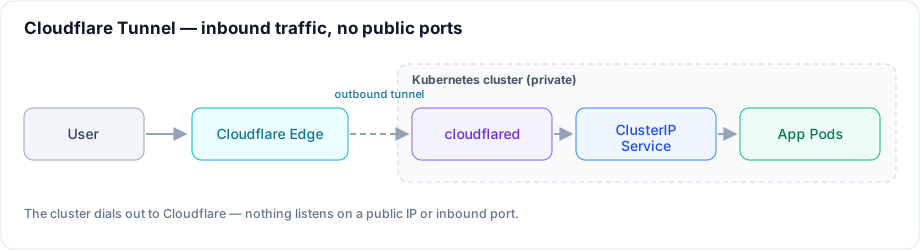
Deploying cloudflared on Kubernetes
First, create your tunnel via the Cloudflare dashboard or CLI and grab the credentials JSON.
Store it as a Secret:
kubectl create secret generic cloudflare-tunnel-credentials \
  --from-file=credentials.json=./credentials.json \
  -n cloudflare
Then deploy cloudflared with a ConfigMap that maps your hostnames to internal services:
apiVersion: v1
kind: ConfigMap
metadata:
  name: cloudflared-config
  namespace: cloudflare
data:
  config.yaml: |
    tunnel: <your-tunnel-id>
    credentials-file: /etc/cloudflared/credentials.json
    ingress:
      - hostname: api.example.com
        service: http://api-svc.default.svc.cluster.local:8080
      - hostname: grafana.example.com
        service: http://grafana.monitoring.svc.cluster.local:3000
      - service: http_status:404
---
apiVersion: apps/v1
kind: Deployment
metadata:
  name: cloudflared
  namespace: cloudflare
spec:
  replicas: 2
  selector:
    matchLabels:
      app: cloudflared
  template:
    metadata:
      labels:
        app: cloudflared
    spec:
      containers:
        - name: cloudflared
          image: cloudflare/cloudflared:latest
          args: ['tunnel', '--config', '/etc/cloudflared/config.yaml', 'run']
          volumeMounts:
            - name: config
              mountPath: /etc/cloudflared/config.yaml
              subPath: config.yaml
            - name: credentials
              mountPath: /etc/cloudflared/credentials.json
              subPath: credentials.json
      volumes:
        - name: config
          configMap:
            name: cloudflared-config
        - name: credentials
          secret:
            secretName: cloudflare-tunnel-credentials
Run two replicas — cloudflared uses its own internal load balancing across them. If one pod dies, traffic shifts to the other with no gap.
Zero Trust access policies
The tunnel gets traffic to your cluster, but you still want to control who can reach what. Cloudflare Access sits in front and enforces identity-based policies before a request ever hits your app.
In the Cloudflare dashboard, create an Access Application for each hostname and attach a policy — e.g., "allow if user email ends in @yourcompany.com and device is managed". This replaces VPN for internal tool access.
Private network routing
For non-HTTP services (databases, internal APIs that shouldn't be exposed via hostname), Cloudflare's WARP-to-Tunnel feature lets enrolled devices reach RFC 1918 addresses routed through the tunnel.
Add a private network route in your tunnel config:
ingress:
  - hostname: api.example.com
    service: http://api-svc.default.svc.cluster.local:8080
  - service: http_status:404

# Enable routing of private IP ranges over the tunnel
warp-routing:
  enabled: true
Then in Zero Trust → Networks → Routes, add your pod and service CIDRs (e.g. the 10.96.0.0/12 service CIDR and your pod CIDR like 10.244.0.0/16). Devices running WARP can now reach those ranges directly, treating your cluster as a private network segment.
What this replaces
- LoadBalancer services (and their cloud costs)
- NodePort + firewall rules
- VPN servers for developer access to internal tools
- Manual TLS certificate management (Cloudflare handles it at the edge)
The tradeoff is taking a dependency on Cloudflare's network. For most workloads that's acceptable — their uptime is significantly better than a self-managed public endpoint.
Related posts
From branch to production: automating multi-environment deployments with GitHub Actions and Argo CD on EKS
How I run 20+ developer environments plus testing, staging and production across two AWS accounts with one standalone deploy-pipeline repo whose workflow every microservice reuses — GitHub Actions building images, self-hosted runners reaching private EKS, and per-cluster Argo CD doing the syncs. On-demand dev deploys, auto-drafted releases and a branch-to-production promotion flow that never rebuilds the artefact.
Building an AI platform on Kubernetes
Once three teams have each rebuilt GPU scheduling, model serving and RAG plumbing, you don't have an AI strategy — you have three. Here's how to turn that into one paved road on Kubernetes: a gateway, a serving layer, GPU compute and the cross-cutting concerns that make it production-grade.
Zero-downtime Kubernetes upgrades: a production-ready strategy
Kubernetes ships three releases a year and you can't skip them — here's how to keep clusters current without users ever noticing, covering version skew, pre-flight checks, workload readiness and a careful node rollout.